A Capacitive Touch Membrane Switch can look like a simple graphic panel, yet its performance depends on careful engineering. Behind each touch area, conductive patterns, overlays, adhesives, controllers, and protective layers must work together. A warm fingertip, a gloved hand, or a drop of moisture can change the sensing response. Small details matter.
Bill Buxton, a respected human-computer interaction researcher, has expressed a useful design principle: “The technology should be invisible.” That idea fits capacitive interfaces well. Users should notice the command, not the sensing circuit beneath the printed legend. This article examines the Top 10 Capacitive Touch Membrane Switch Types, including illuminated panels, backlit keypads, flexible circuits, metal-overlay designs, and custom industrial interfaces. Each type offers different benefits for feedback, durability, cleaning, and production cost.
Real-world selection is rarely perfect. A sleek surface may reduce tactile feedback. A highly sensitive design may react poorly near water or electrical noise. Engineers therefore test more than appearance. They measure touch thresholds, false activations, icon visibility, flex life, and adhesive stability. IEC-related testing, environmental trials, and repeated user checks can expose weaknesses early. Still, no switch suits every product. That is the difficult part. The right choice depends on the enclosure, operating environment, user habits, and expected service life. This guide compares those factors clearly, while recognizing that laboratory results may not fully predict field performance.
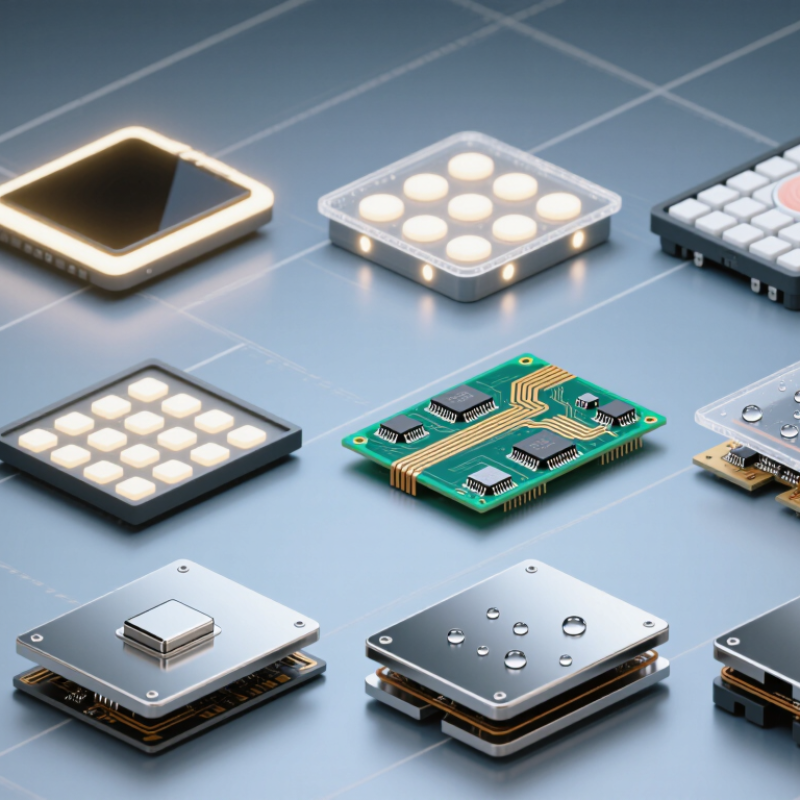
Capacitive touch membrane switches detect a finger through a change in electrical capacitance. A transparent or printed electrode sits beneath a thin dielectric overlay. When a finger approaches, it alters the local electric field. The controller measures this shift and converts it into a switching command.
Designers typically choose among surface-capacitive, projected-capacitive, mutual-capacitance, self-capacitance, and multi-key matrix structures. Electrode spacing, overlay thickness, grounding, and shielding affect sensitivity. Moisture can also create false touches. According to Grand View Research’s Touch Screen Display Market report, the global market reached about USD 76.5 billion in 2022 and may grow at an 8.6% CAGR through 2030. This wider market data supports continued demand for compact human-machine interfaces, but it does not guarantee every membrane design will perform well. A prototype may pass in a dry laboratory and fail near a wet glove or metal chassis. That gap deserves honest testing.
Tips: Keep sensing traces short and separate them from noisy power lines. Test bare fingers, gloves, moisture, temperature changes, and nearby metal parts. Follow relevant EMC and electrical safety requirements, including IEC 61000 testing where applicable. A larger sensing pad often improves sensitivity, but excessive size can reduce touch accuracy. This trade-off is easy to underestimate.
Representative maximum overlay thickness for reliable touch detection in common capacitive membrane switch designs.
Capacitive switches detect changes in an electric field caused by a finger or conductive object. Projected-capacitive and mutual-capacitive structures generally support thicker overlays and multi-touch, while sliders, wheels, and simple button electrodes are optimized for focused human-machine input. Values are representative engineering ranges and vary with electrode geometry, controller sensitivity, overlay material, grounding, and environmental conditions.
Capacitive touch membrane switches are classified by how their sensing layers, overlays, and controls are designed. The electrode pattern is a major dividing feature. Single-point layouts suit simple start or stop functions. Matrix layouts support dense key arrangements. Slider and wheel patterns provide continuous adjustment for brightness, speed, or temperature.
Overlay construction creates another practical category. Flat polyester surfaces are easy to clean, while contoured overlays improve finger placement. Printed graphics can define icons, zones, and touch boundaries. Backlit versions use cutouts, light guides, or embedded illumination. The visual result matters. So does light uniformity.
Activation behavior also separates switch types. Some designs respond to a light touch, while others use a defined touch threshold to reduce accidental input. Haptic feedback may come from a click dome, vibration, or visual confirmation. Sealed constructions protect sensing areas from dust and moisture. They still need careful edge bonding. One weak edge can undermine the whole assembly.
I have seen attractive prototypes fail during gloved-hand testing. That is a useful warning.
Controller compatibility, grounding, cable routing, and electromagnetic noise should be reviewed early. Material thickness also changes sensitivity. A thicker overlay may feel durable but reduce detection reliability. Designers sometimes optimize appearance too quickly. Real-world testing should include wet fingers, rapid touches, cleaning cycles, and low-temperature conditions. Classification is not only about appearance; it reflects how the switch senses, responds, and survives.
Top 10 Capacitive Touch Membrane Switch Types
Common capacitive touch membrane switches suit basic control panels, appliance interfaces, and compact equipment. They use changes in electrical capacitance rather than mechanical button travel. The commonest designs include single-touch, multi-touch, surface-capacitive, projected-capacitive, self-capacitive, and mutual-capacitive types. Printed conductive traces sit beneath a thin polyester overlay. A finger can activate a function through light gloves, depending on sensitivity settings.
According to MarketsandMarkets, the global touchscreen market may reach about USD 94 billion by 2027, supported by demand for thinner and more durable interfaces. Omdia has also reported continued growth in automotive and industrial display applications. These figures do not describe membrane switches alone, but they show the wider shift toward touch-based controls. Projected-capacitive designs generally provide better gesture support, while surface-capacitive types remain practical for simple, single-point commands. Keep expectations realistic.
For basic applications, a single-touch membrane switch often offers the clearest balance between cost and usability. Backlit versions improve visibility in dim control cabinets. Sealed overlays help resist dust, splashes, and cleaning fluids. A poorly tuned sensor can still trigger near a wet surface. That detail is easy to miss. Engineers should test actual gloves, cable lengths, overlay thicknesses, and mounting materials before production. IEC 61000-4-2 testing can help evaluate electrostatic-discharge resistance, while user trials reveal whether symbols, spacing, and feedback feel intuitive. Some projects still benefit from tactile domes beneath capacitive areas, especially when operators need confirmation without looking.
| No. | Type | Sensing Principle | Typical Input | Common Basic Applications | Main Advantages | Key Considerations |
|---|---|---|---|---|---|---|
| 1 | Single-Electrode Self-Capacitance | Detects the change in capacitance between one sensing electrode and the user or surrounding electrical reference. | One touch point at a time; finger or conductive stylus. | Power buttons, mode selectors, small control panels, simple appliance interfaces. | Simple circuit layout, low component count, suitable for basic controls. | Can be affected by grounding, nearby conductive objects, and environmental noise. |
| 2 | Mutual-Capacitance Matrix | Measures the capacitance at intersections between transmitting and receiving electrodes arranged in a matrix. | Accurate touch position; supports multiple sensing points when properly designed. | Keypads, operator panels, display overlays, instrument controls. | Good position accuracy and reliable separation between adjacent touch areas. | Requires more complex electrode routing and signal processing than a single-electrode design. |
| 3 | Surface-Capacitive Membrane Switch | Uses a conductive coating or layer connected to sensing circuitry; a touch changes the surface electrical field. | Usually single-touch finger input. | Public terminals, simple equipment panels, basic industrial controls. | Straightforward construction and smooth, easy-to-clean touch surface. | Limited multi-touch capability and sensitivity to surface contamination or moisture. |
| 4 | Projected-Capacitive Membrane Switch | Projects an electrical field through an insulating overlay using patterned electrodes beneath the touch surface. | Finger touch, with single-touch or multi-touch operation depending on the controller and electrode design. | Consumer controls, medical equipment, security panels, compact human-machine interfaces. | Durable surface, clear graphics, accurate touch location, and support for sealed designs. | Needs careful grounding, shielding, overlay thickness, and controller tuning. |
| 5 | Single-Touch Capacitive Membrane Switch | Uses one independent capacitive sensing zone for each button or control area. | One button or touch zone at a time. | Microwave controls, HVAC panels, lighting controls, vending equipment, and small appliances. | Simple user interface, low training requirement, and easy graphic labeling. | Not intended for gestures or simultaneous command entry. |
| 6 | Multi-Touch Capacitive Membrane Switch | Uses a two-dimensional electrode pattern and controller algorithms to identify more than one touch point. | Two or more simultaneous touches, gestures, or combined commands. | Navigation panels, graphical interfaces, laboratory instruments, and advanced control displays. | Supports pinch, zoom, swipe, and simultaneous control actions. | Higher design and software complexity; false touches must be controlled in noisy environments. |
| 7 | Transparent Capacitive Touch Switch | Uses transparent conductive electrodes so the touch circuit can be placed over or in front of a display or indicator. | Touch input through a transparent overlay. | Display controls, status panels, digital instruments, and compact user interfaces. | Combines graphics, indicators, and touch controls in a compact front panel. | Transparency, optical clarity, glare, and display compatibility require careful material selection. |
| 8 | Backlit Capacitive Membrane Switch | Combines capacitive sensing electrodes with LEDs or another light source beneath printed graphics. | Single-touch or multi-touch input with illuminated symbols or zones. | Automotive controls, equipment used in low light, appliance panels, and night-operation interfaces. | Improves visibility and allows attractive, clearly defined touch zones. | Requires control of light uniformity, heat, LED placement, and electrical interference. |
| 9 | Glove-Compatible Capacitive Switch | Uses increased electrode sensitivity, optimized signal processing, or a suitable overlay to detect reduced-capacitance touches. | Finger touch through selected thin gloves or with a conductive glove, depending on the design. | Industrial machinery, clean work areas, medical equipment, and outdoor controls. | Reduces the need to remove gloves during routine operation. | Performance depends on glove material, thickness, moisture, overlay construction, and controller settings. |
| 10 | Sealed Water-Resistant Capacitive Switch | Uses a sealed overlay, bonded layers, and tuned sensing electronics to protect the circuit from routine splashes and contaminants. | Finger touch through a continuous, non-mechanical front surface. | Kitchen appliances, laboratory equipment, washdown-capable controls, and outdoor devices. | Easy cleaning, fewer openings for dust or liquid entry, and no mechanical key travel. | Water, condensation, salt, and conductive contamination can cause false touches unless properly compensated. |
Advanced capacitive membrane switches serve equipment where ordinary buttons feel too limited. Projected-capacitive panels offer precise finger tracking and clean, sealed surfaces. Mutual-capacitance designs support multi-touch commands, while self-capacitance sensing suits simpler single-touch controls. Glove-friendly versions use adjusted sensitivity and larger sensing areas. They need careful calibration.
Specialized designs include waterproof, chemical-resistant, EMI-shielded, transparent, backlit, flexible, force-sensing, haptic-feedback, narrow-bezel, and high-temperature types. A laboratory controller may use a sealed surface against disinfectants and spilled samples. A vehicle console may require operation through gloves, sunlight, and vibration. In both cases, the overlay, adhesive, sensor pattern, and tail connector must work as one system.
I have found that small details often decide field performance. Rounded corners reduce trapped moisture. A textured coating can improve grip but may collect dust. Shielding helps in electrically noisy cabinets, although poor grounding can create new sensing errors. Testing should include wet fingers, thick gloves, repeated cleaning, temperature cycling, and accidental pressure. Not every advanced switch needs every feature. Overdesign increases cost and may confuse operators. A prototype can pass a bench test and still fail after months of real handling. That uncomfortable gap deserves attention.
Choosing among capacitive touch membrane switch types requires more than comparing button shapes. Start with the operating environment. A sealed switch suits kitchens, medical panels, and dusty equipment better than an exposed design. Check the rated temperature, humidity resistance, chemical tolerance, and expected activation cycles. A glossy surface may look attractive, but fingerprints can reduce readability under strong lighting. Test it in real conditions.
The sensing method also matters. Self-capacitance works well for simple keys, while mutual-capacitance designs can support gestures and closer spacing. Consider whether the panel needs sliders, backlighting, haptic feedback, or glove operation. Thick overlays may improve durability but reduce sensitivity.
I have seen prototypes pass bench testing and fail when users wore damp gloves. That gap is easy to miss.
Review electrical stability before approving a type. Nearby motors, long cable runs, and metal housings can create false touches. Ask for sensitivity tolerances, calibration behavior, and electromagnetic interference data. Response time should match the application, especially for industrial controls.
Cleaning procedures deserve equal attention. Harsh solvents can cloud some films or weaken printed graphics. Cost comparisons should include tooling, replacement rates, assembly time, and field testing. No selection matrix is perfect. Real user trials often reveal one uncomfortable weakness.
They control specialized equipment where ordinary buttons feel too limited. Common settings include laboratories, vehicle consoles, kitchens, and industrial cabinets.
Self-capacitance suits simple, single-touch keys. Mutual-capacitance supports multi-touch commands, gestures, and closely spaced controls.
Glove-friendly switches use adjusted sensitivity and larger sensing areas. Test thick and damp gloves, because performance may change unexpectedly.
Sealed surfaces resist dust, spills, disinfectants, and moisture. Rounded corners also reduce trapped liquid around the panel edges.
Waterproof construction, chemical resistance, shielding, flexible materials, and high-temperature operation can improve reliability. Every feature needs practical testing.
Shielding can reduce interference near motors and long cables. Poor grounding may create new sensing errors, so electrical testing remains necessary.
Textured coatings can improve grip but may collect dust. Glossy surfaces look clear, yet fingerprints can reduce readability under strong lighting.
Test wet fingers, gloves, repeated cleaning, temperature cycling, vibration, and accidental pressure. Bench results alone can mislead.
No. Thick overlays may resist wear but reduce sensitivity. The best balance depends on handling, cleaning, and activation requirements.
Include tooling, assembly time, replacement rates, calibration, and field testing. A cheaper panel may become expensive after repeated failures.
This guide explains how a Capacitive Touch Membrane Switch detects user input through changes in an electrical field rather than relying on traditional mechanical movement. It introduces the basic operating principles and shows how factors such as electrode layout, sensing method, surface structure, feedback, illumination, and environmental protection are used to classify different designs. Understanding these features helps clarify how touch interfaces can be adapted to different control requirements.
The article reviews common capacitive touch membrane switch types for basic applications, including single-touch, multi-key, illuminated, and customizable configurations. It also examines advanced options for specialized uses, such as multi-touch control, glove-compatible sensing, sealed surfaces, integrated visual indicators, and enhanced resistance to moisture or cleaning agents. Finally, it presents practical selection criteria, including sensitivity, response speed, durability, installation conditions, user feedback, customization needs, and overall cost, helping readers compare solutions and choose a suitable design for their application.